How Feed Optimisation Drove 37% More Revenue, Beating Peak Season
Google only knows what your feed tells it. Recategorising one client's 17K-product feed, no-bid, budget, or structure changes, drove +37% revenue and +32% ROAS, beating the previous peak season. Here's how it works.

Feed optimisation: the hidden lever most PPC specialists never touch
When you onboard a new client or take over an ecommerce account where the KPIs are ROAS, revenue, and number of sales, the feed setup is usually not the first thing you check, especially when everything looks fine and the client is happy. But most of the time, that's exactly where the problems are hiding.
Because of how agencies are structured and how responsibilities get split with clients, PPC specialists often never look at how the feed is actually built: whether the attributes are in place, whether they're correct and relevant to the products, whether titles, Google Shopping categories, brands, and custom labels are doing their job. When I worked at a large agency, my entire relationship with the feed was assigning a custom label. That was it. Everything else was the client's responsibility or the feed management team's.
After several years working with multiple ecommerce clients, I started getting client access to back ends, the feed, the product catalogue, the underlying business data, so I could identify problems, see how marketing actually affects sales, and make better decisions off the back of it. That access is what taught me how important feed attributes are, and why it pays to keep a close eye on the feed, optimise it, and set up rules that let Shopping and PMax do the heavy lifting.
A little theory: why these attributes exist and how Google reads them
Google can't see your products the way a shopper can. It only knows what the feed tells it. Every attribute is a signal, but those signals do three different jobs.
1. Query matching, deciding which searches you're relevant to
This is about whether Google shows your product for a given search at all, and how confidently.
The title does most of the work here. Google parses it as language, reads it left to right, and weights early words more heavily, so a title that front-loads brand, product type, and key specifiers (“Canon EOS R50 Kit with RF 18-45mm Black") matches far better than one that leads with fluff or SKUs (“SALE! Best Mirrorless Camera 2025 CAN-R50-1845-BLK Free Delivery"). The description adds secondary, long-tail context but carries less weight. Because these are free-text fields, Google has to interpret them. A vague or keyword-stuffed title is a noisy signal, and Google matches noisily against it.
Structured fields feed this too. Brand, GTIN, and MPN let Google identify the exact product against its own catalogue. A valid GTIN maps your item to a product Google already understands and can match confidently, instead of inferring everything from your text. google_product_category and product_type add category-level context that helps disambiguate what the product actually is.
The takeaway: strong structured data lets Google match on certainty; weak data forces it to match on inference, and inference is where irrelevant traffic and wasted spend come from.
2. Filtering and eligibility, deciding where and how you can show
This is separate from matching. Even a perfectly matched product can be excluded from a surface or format if it's missing the attribute that surface requires.
Colour, size, material, pattern, gender, and age_group populate the filters shoppers use on Shopping surfaces. Someone narrowing to "blue / size M" only sees products where those fields are filled. Leave them blank, and you're invisible in that refinement, no matter how relevant you are. Beyond filters, attribute completeness gates eligibility for richer formats and surfaces; some placements simply require certain fields to be present. So these attributes aren't about whether you match. They're about whether you're allowed to appear once you do.
3. Variant handling, how Google groups and displays your products
This one is almost entirely structural. item_group_id tells Google that a set of listings are one product in different variants; color, size, material, and pattern then define how those variants differ. Get it right and Google consolidates ten size listings into one clean product with a size selector. Get it wrong, missing item_group_id, or inconsistent variant attributes, and Google may treat them as ten unrelated products, splitting your data, competing against yourself, and cluttering the surface. This barely touches query matching, but it heavily affects how coherent your presence looks and how your performance data aggregates.
Why the three-way split matters
The same attribute can serve more than one effect, color helps matching, powers filters, and defines variants, but the reason you populate it differs, and so do the symptoms when it's missing. A matching problem shows up as irrelevant search terms. An eligibility problem shows up as missing impressions on formats you should qualify for. A variant problem shows up as fragmented data and cannibalisation. Knowing which symptom you're looking at tells you which attribute to fix.
A real client example
I took over an account selling cameras, camera equipment, lenses, and other electronics. The first thing I noticed was that the feed categorisation was far too broad. Products weren't allocated to specific categories like video cameras or digital cameras, they were all lumped under one parent category, Cameras & Optics or Electronics.
On top of that, plenty of products were misfiled outright:
- Drones were sitting under "Toys," instead of "Toys & Games > Toys > Flying Toys"
- Printers were sitting under "Electronics," instead of "Electronics > Print, Copy, Scan & Fax > Printers, Photocopiers & Fax Machines"
- Worst of all, many cameras and lenses, high-value products, were filed under "Electronics" instead of "Cameras & Optics." These were exactly the items driving the account's revenue, and they were sitting in the wrong category entirely, in a bucket that told Google the wrong story about what they were.
My original reason for fixing it was structural. I wanted a cleaner base so we could build a better campaign structure and allocate products to campaigns more accurately. But it ended up changing things completely.
Why recategorisation moved performance
It's worth being precise about the mechanism, because "we fixed categories and performance went up" invites the obvious correlation, not causation pushback. Two things happened, and they compound.
First, correct google_product_category gives Google better context for query matching. A drone filed under "Flying Toys" instead of "Toys" is far more likely to be understood, and matched, against drone-intent searches rather than generic toy queries. Cleaner categorisation reduces Google's guesswork and pulls impressions toward more relevant, better-qualified traffic.
Second, and this is the lever people underrate, a clean taxonomy is what lets you build a campaign and bidding structure that reflects real category economics. Once products sit in accurate categories, you can segment them into campaigns and bid strategies that treat a high-margin, high-ROAS category differently from a low one, instead of averaging everything together under one broad bucket. Better matching brings the right traffic in; better structure lets you fund it correctly. That's the chain behind the numbers below.
How I approached the re-segmentation
For anyone wanting to do the same, this was the rough process across 17,000+ products:
- Audited the existing mapping first. I pulled the full product catalogue and looked at how each product was currently categorised versus where it should sit in Google's taxonomy, flagging the broad "catch-all" categories and the outright misfiles (drones under Toys, printers under the wrong branch).
- Worked top-down by category, not product-by-product. I fixed the parent buckets first, then drilled into sub-categories, which let me handle thousands of products with a manageable set of rules rather than one-by-one edits.
- Used feed rules to enforce the correct mapping so categorisation stayed correct as new products were added, instead of being a one-off cleanup that drifts over time.
- Kept everything else constant on purpose. Over the 90-day test, I didn't push spend, didn't restructure campaigns, and didn't change bid strategies, precisely so the categorisation work was the variable being measured.
The results
We implemented the changes on 23 January. Over the following 90 days, we saw a 4% increase in cost, a 1% decrease in conversions, a 37% increase in revenue, and a 32% increase in ROAS. We didn't push spend, and we didn't change the campaign structure. Performance picked up naturally once products sat in the right categories.
The comparison makes it stronger. We measured 24 Jan , 23 Apr against 26 Oct , 23 Jan, which means the improvement is measured against peak season: Black Friday and Christmas, the period when ecommerce businesses usually post their highest revenue of the year. Beating that comparison off the back of categorisation alone is the part I find most telling.
At the category level, the reallocation redistributed performance in a way that improved overall efficiency:
| Category | Cost | Revenue | ROAS |
|---|---|---|---|
| Cameras & Optics | +13% | +42% | 1,039% (+26%) |
| Electronics | −75% | −67% | 891% (+32%) |
| Toys | −23% | +7% | 1,115% (+39%) |
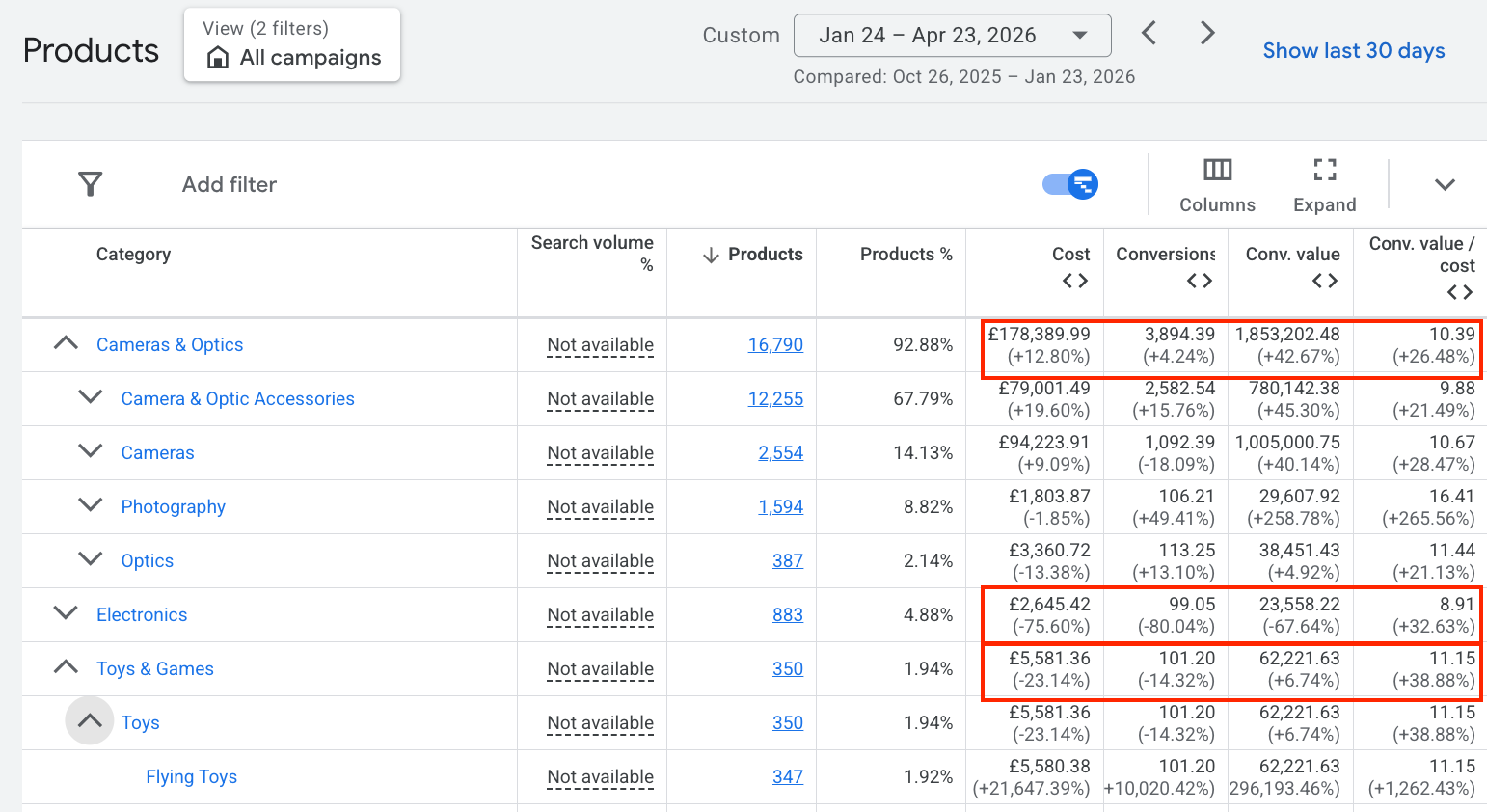
Spend flowed toward the categories that deserved it and away from the ones that didn't, and efficiency improved even in categories where we pulled budget back. All of it without touching a single bid.
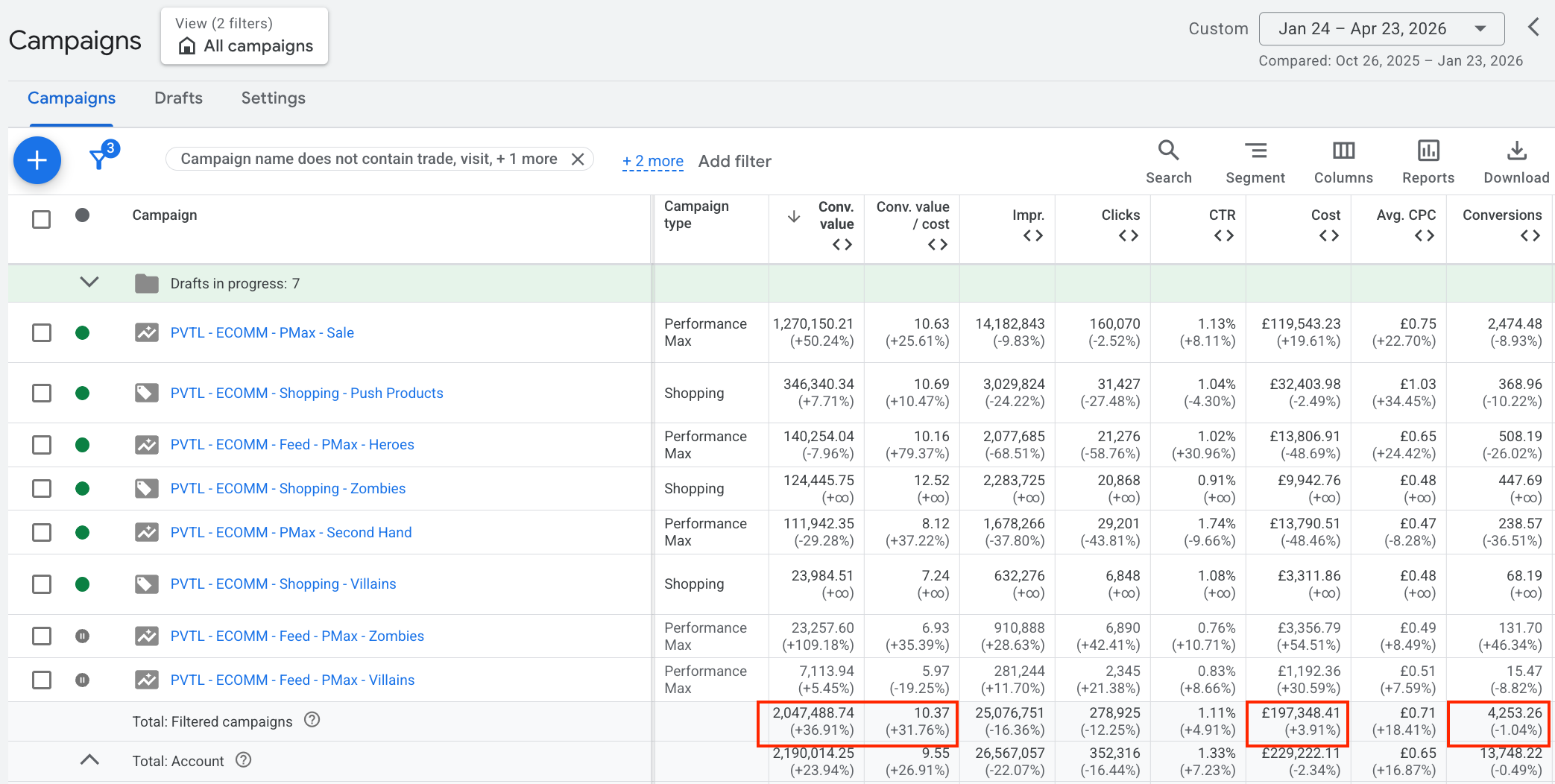
Across all Shopping and PMax campaigns, conversion value rose +37% and ROAS +32% on just +4% more cost, with conversions flat (−1.04%), more value from the same orders and near-identical spend, entirely off the back of the feed recategorisation.
The point
This example is purely about categorisation, but the same logic applies to every attribute in the theory section above. Titles, identifiers, variant attributes, each one changes how Google understands your products, and therefore what it can do with your spend. Categorisation just happened to be the biggest lever on this particular account.
Before you touch bids or budgets, it's worth asking what Google actually knows about your products. Most of the time, the answer is: less than you think, and that's the ceiling on everything you're trying to scale.
This is the power of feed optimisation.